3-5days
Mobile form sprint, field-tested with real crews
Form Conversion Sprint (3-5 days)
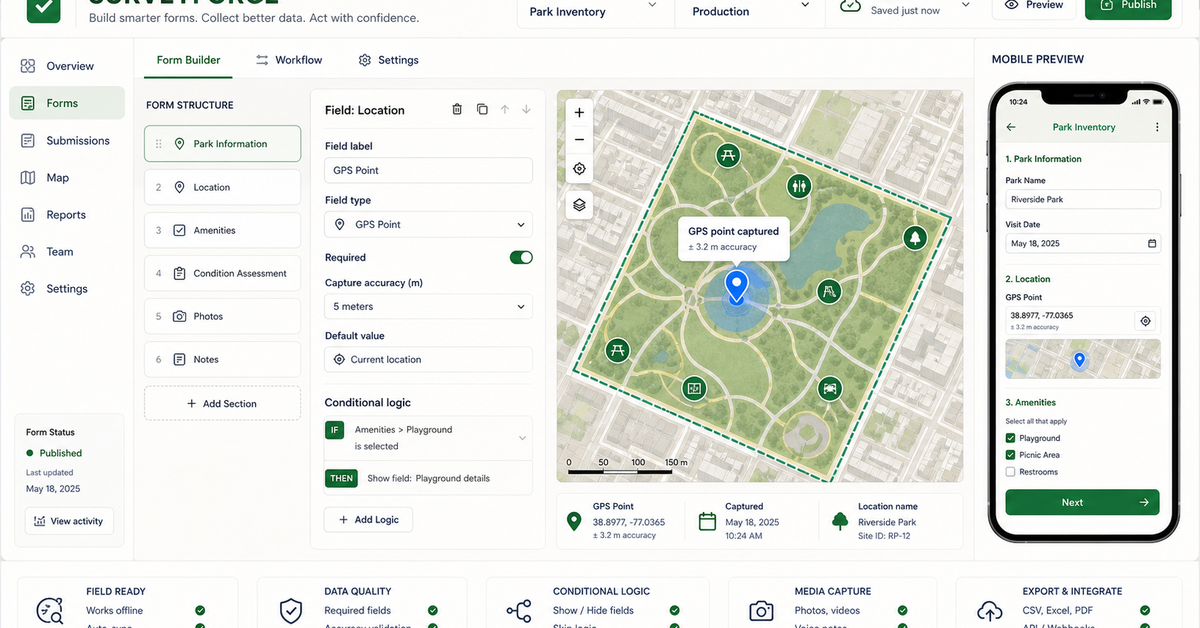
Mobile form with validation, conditional logic, photo capture, and field testing on real crews.
We turn inspections, asset inventories, environmental sampling, construction checks, and field surveys into mobile workflows — with clean handoffs into Esri, open-source, and spreadsheet stacks.
Mobile form sprint, field-tested with real crews
Mobile form with validation, conditional logic, photo capture, and field testing on real crews.
Map view, job status, issue queue, and exports for the office team — no manual report writing.
Multi-crew form library, GIS layers, QA workflow, runbooks, and documented handoff into your GIS of record.
Our POC environment that shows the survey output before you commit to a full engagement.
Pre-built surveys for utility, environmental, construction, asset, and agricultural workflows.
Field mapping implementation, mobile GIS forms, Survey123 implementation, and field data collection workflow.
GPS capture, conditional logic, photo fields, offline needs, and validation rules.
Submitted records land in a map/table view where exceptions and missing fields are visible.
Survey123, Field Maps, Fulcrum, KoboToolbox, ODK, spreadsheets, and GIS handoffs.
Bring the closest real workflow. We map what you send, what your team reviews, what evidence stays visible, and what you receive at handoff.
Worst current form, field task, GPS/photo requirements, offline constraints, and downstream reporting needs.
We redesign the form logic, map state, validation rules, and office review path.
Submitted records show location, photos, status, exceptions, and source context.
Deployable field form, review queue, export packet, and implementation plan.
A field workflow succeeds only when crews can use it under real conditions.
Platform choice depends on offline needs, licensing, crew devices, and reporting requirements.
Existing forms, inspection workflows, GPS requirements, photos, and export destinations.
Field validation, required fields, exception review, and office-side checks.
Mobile form, dashboard, GIS layer, spreadsheet, PDF packet, or Survey123/Kobo/ODK export.
No vague discovery phase. You bring four or five things, we return a specific plan you can evaluate.
No manual import, no reconciliation. The crew taps submit, the office sees it within seconds.
{
  "submission_id": "847-FT-203-20240812-1118",
  "job_id": "2024-0847",
  "inspector_id": "FT-203",
  "submitted_at": "2024-08-12T14:23:08-04:00",
  "location": { "lat": 38.8951, "lon": -77.0364, "accuracy_m": 2.1 },
  "fields": {
    "asset_condition": "fair",
    "notes": "Surface cracking at NW corner; recommend re-inspect in 90d",
    "photo_id": "field_847.jpg",
    "photo_url": "s3://gss-field/2024/08/12/field_847.jpg"
  },
  "sync_status": { "validated": true, "postgis_id": 8472, "dashboard_ack": true }
}No open-ended retainers. No "discovery phases" that bill for months without producing anything you can evaluate.
3-5 days to build the mobile form with validation, conditional logic, photo capture, and offline support. Field-tested with one of your crews.
Crews use the form on real jobs for 1-2 weeks. We watch the submissions, catch the friction points, and iterate before scaling.
Office-side view: map of active jobs, status queue, exception flags, and one-click exports to your GIS of record or stakeholder reports.
Multi-crew form library, integration into Survey123 / Field Maps / Fulcrum / KoboToolbox, and runbooks for the next deployment.
These open the real, interactive demos on our main site — not screenshots, not videos. Click around before you decide to talk to us.
Build and deploy field surveys 10x faster. Free during beta.
No credit card. We reply within one business day.
Survey123 is the data collection layer — we build on top of it about 80% of the time. The 'what we build' is the form library, validation logic, office-side dashboard, and automated sync into your GIS. Survey123 alone gets you a form; we get you a system.
Form sprint is 3-5 business days from kickoff to deployment. We field-test with one of your crews in week 2 before scaling to the rest. Most crews are productive on day 1 without formal training.
No. All forms are offline-first with sync on reconnect. Crews can work in basements, tunnels, or remote sites — data uploads automatically when they're back in coverage.
A workspace for building Survey123 configurations from templates 10x faster than hand-editing XLSForms. It outputs standard Survey123 files — no lock-in. Free during beta for teams piloting with us.
Dispatch optimization, container tracking, and demand prediction built for roll-off dumpster companies — runni…
Anchored in the NAIPAI pattern: ask aerial, drone, or satellite imagery useful questions, keep confidence and …
We automate spatial workflows for municipalities, utilities, and infrastructure teams — asset inventory, surve…
We transform satellite imagery, drone captures, LiDAR point clouds, GIS vectors, and change-detection scenes i…
The form that crews hate, the one that needs three rounds of cleanup before the office can use it. Bring that one. We will rebuild it with you over 30 minutes.
Send your worst field form